|
This week, we explored a few resources for teaching our students about Digital Citizenship: Common Sense Media, Google’s Be Internet Awesome, and Stanford’s History Education Group. Each site has a VAST, yet distinct, selection of resources that are useful to students and families in the area of Digital Citizenship in general, and as it relates to digital communication. Stanford’s History Education Group offers a link to “Civic Online Reasoning” on their site. It seems to be very accurately named, because this resource, geared for middle school and up, is designed to initiate critical thinking about online articles, photos, advertisements, and social media claims. Each category resource offers a task, overview, and rubric. The task involves presenting an example of an online photo with a claim, or an advertisement, and then asking the student to evaluate whether it could be legitimate or not, citing evidence or reasons for their conclusions. The overview gives the teacher background and reasoning, while the rubric will identify levels of responses that indicate where students might be in their development of civic online reasoning: mastery emerging and beginning. One way that I might use this site to make digital citizenship personal for the students at my school is to share these resources with my 4th and 5th grade teachers. While the site is geared for middle schoolers and up, I think these activities could be modeled as a whole class activity, with the teacher selecting appropriate modules and then working through them together. Teachers could model a response, and students could be given the sample rubric responses and then attempt to sort them into the levels of master, emerging, and beginning, in groups or pairs and then review as a whole class with rationales. Being able to distinguish legitimate information from fake or biased information will help students to communicate digitally from a much more stable standpoint and prevent so much misunderstanding. Google’s Be Internet Awesome site is geared for younger students, grades 3-6. The site offers lessons in five areas of Digital Citizenship:
This resource could be used to make digital citizenship personal for our students by sharing these lessons with my teachers. I could offer a lunchtime PD session where I share these lessons and games with teachers and we could explore “Pear Deck.” Google has put all the Digital Citizenship lessons on google slides using the add-on “Pear Deck,” which allows students to be formatively assessed during the lesson presentation. I think this option makes the lessons easy to customize for the grade level and students (slides can be added, removed, and modified). I watched some videos on how Pear Deck works, and it seems really engaging. This would be really fun to play around with teachers and learn together. The great thing is that Google offers Pear Deck slides for every Digital Citizenship topic, covering digital communication, information safety, and critical thinking about online information Image taken from: https://beinternetawesome.withgoogle.com/en_us/slides 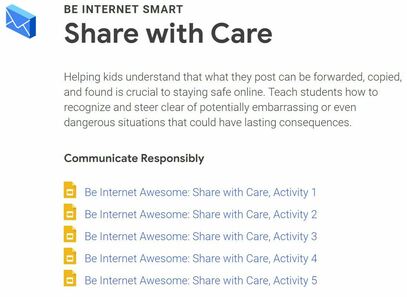 Image taken from Google's Be Internet Awesome Curriculum: https://beinternetawesome.withgoogle.com 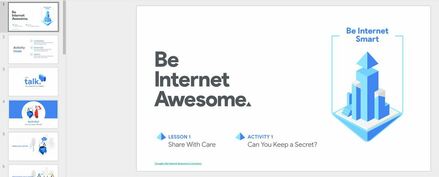 Finally, I saved my favorite for last: Common Sense Media. This is an awesome resource for teachers, but I have been using it as a parent for many years. The only negative thing I can say about Common Sense Media is that sometimes the resources are so plentiful that one can get lost. For this week’s learning, I decided to go ahead and let myself get a little lost. I clicked on the “Educators” tab at the top, and then “Digital Citizenship” to find their offerings on the topic of Digital Communication. Image taken from: https://www.commonsense.org/education/scope-and-sequence 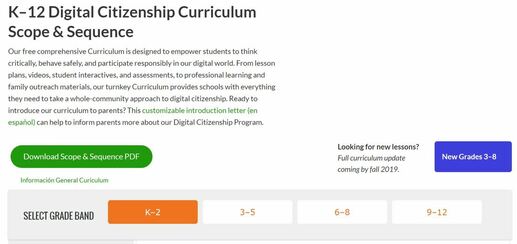 If you click on “Find a Lesson,” you are able to filter by grade level (K-12), or by topic. Since I am not a classroom teacher, I didn’t feel any “sparks” for these lessons, so I went back to their main page for educators and clicked on “Toolkits by Topic.” There are several toolkits available on different Digital Citizenship topics, but I was quickly interested in this one: Image taken from: https://www.commonsense.org/education/toolkits  This toolkit is awesome. This is my favorite example of how digital citizenship could be made very personal for teachers, students and families at my school. In the free webinar that describes how to organize a “#devicefreedinner” event at your school, Kelly Mendoza (director of learning and engagement at Common Sense Education) says, “...part of being a digital citizen is having media balance in your life and making sure that technology is a supportive tool, and not a distraction in a way that is detrimental to your relationships.” The toolkit provides classroom activities and parent tips on topics such as:
7 Comments
Catalina Goldstein
2/9/2019 10:26:39 am
Hey Jona, I had quickly written off the Stanford site as being too mature for my kiddos. But you brought up that you could use it to model whole class. I think that bit of exposure to sorting through information is a necessary skill, especially in our digital age. Researching is an extremely important skill. We're beginning to let our kiddos research on their own. They need to be able to decipher information for themselves.
Scott Marsden
2/10/2019 08:22:14 am
Jona,
Jona Sandau
2/10/2019 04:06:57 pm
Thank you, Scott! I really enjoyed exploring the resources! The screenshot tool that I use is actually a feature on my district issued Lenovo. There is a "scrolling" function key menu above the keyboard that offers a snip tool, which allows you to crop and markup any shot you take. I really love it and use it ALL the time!
Monica Knecht
2/10/2019 11:52:40 am
Jona,
Julie Lovie
2/10/2019 08:32:13 pm
Jona awesome detail reviewing all 3 sources. I found the Stanford and Common sense to fit my needs best. This could be another way for to connect with parents as you work on the reading support at home you could use that connection to educate parents. Your screen shots are awesome and I need tons of help with this I know this is off topic but super important skill I am going to try it again. Common sense really broke things down for the different grades very well I like that you showed that screen shot. Very detailed post thank you for your modeling.
Tess Giner
2/10/2019 10:15:18 pm
This was a great blog! Very informative. This should go somewhere more public. You have a ton of information in a very clear, concise package. I feel that a wider audience should read this blog. I wonder if NVUSD or NCOE has a site where you could post this.
JP Castillo
2/11/2019 10:27:01 pm
Even though Be Internet Awesome is geared more towards younger students, I think older students with their more competitive nature could still find it informative - as long as I preface it with my own set of lessons. I would use it more to reinforce what I should already be teaching them. I always appreciate your blog posts in that it elevates my own learning and causes me to think deeper! Leave a Reply. |
Jona SandauI'm a student in the Innovative Learning Master's Program at Touro University. I'm really excited to make a difference for my students! Archives
March 2019
|
 RSS Feed